

LibreLinkUp

LibreLinkUp21,205 is an app that allows family, friends, 
or caregivers to share in your diabetes journey 
and help you achieve success. 
A woman sitting on a bed using a smartphone beside a younger individual resting, highlighting shared glucose monitoring with LibreLinkUp.
A student seated at a classroom desk writing on paper while wearing a FreeStyle Libre sensor on the upper arm during daily school activities.

Share21,25 your sugar readings with the ones who count.

LibreLinkUp provides a simple, safe, and secure way to share your readings with others. It gives them added peace of mind3 knowing they can support you better.

  • Free and compatible with FreeStyle LibreLink app12
  • Invite up to 20 family members, friends, 
or caregivers to connect21
  • Once connected, they get automatic25 uploads 
of your sugar readings

Getting started with LibreLinkUp.

To allow others to have access to your sugar data, you’ll need to: 
A smartphone screen displaying an invitation message within the FreeStyle LibreLink app, representing the send invite step.
Send an invite.

Choose who you want to connect21 with and send them an invite with your FreeStyle LibreLink app12.

A smartphone screen showing the LibreLinkUp download prompt with an orange share icon, illustrating the app installation step.
Have them download the app.

Once your connections receive the invite, they’re ready to download the LibreLinkUp app.

A smartphone screen with an orange share icon, representing the step where users connect securely through the LibreLinkUp app.
Connect with each other.

When they open the app, they can follow the prompts to create a secure account and connect 
with you21.

Two smartphones displaying FreeStyle Libre glucose readings of 112 mg/dL with trend graphs, illustrating real‑time sugar monitoring features.

LibreLinkUp25 lets you

share your progress.

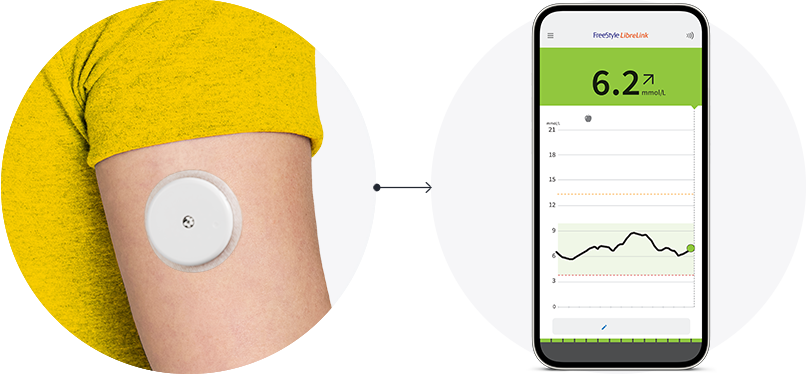
With a secure built-in share feature, you can  invite your loved ones to remotely21,25 track your sugar data and trends in real time from their smartphone12.

Each family member or caregiver you decide to add will need to download the LibreLinkUp app to get started. 

A headphone icon.

We’re here to help.

Get all the support and guidance you need when you need it.

You might also like: