

Understanding your FreeStyle LibreLink app data

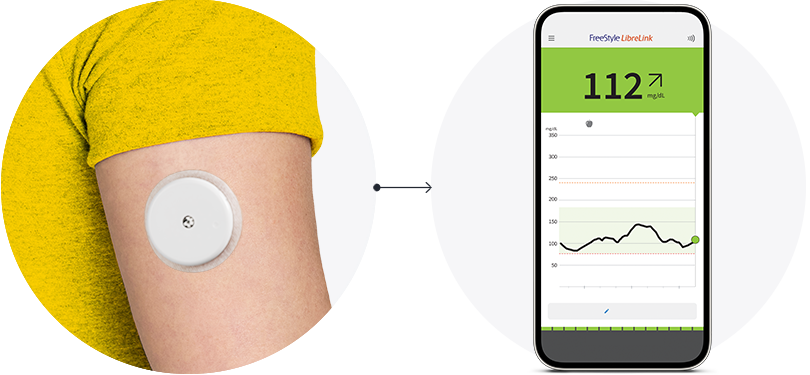
Once you’ve connected your sensor to your smartphone, you’ll gain insights into what affects your sugar levels. Here’s some handy information that explains what you’ll see. 
Two phones, each displaying a different screen from teh FreeStyle Libre app.

Use the data on your FreeStyle LibreLink app12 to see how you’re progressing over time. 

A phone displaying the FreeStyle Libre app displaying four markers: A, B, C, and D showing different real time glucose monitoring information.

Monitor trends and patterns from 
your device to see how well you’ve been managing your sugar over time.

  • Current sugar reading

    Measured every minute, and the color lets you know if you’re in range. 

  • Trend arrow

    Indicates the direction your sugar is heading and how quickly it’s rising or falling. 

  • Sugar history

    Continuous sugar graph shows how your levels have changed.

  • Add note

    Track food, insulin use, exercise, and other events.

A phone displaying the FreeStyle Libre app with three icons labeled A, B, and c showing how much time is spent in each glucose range.

Track your progress over time to see how much time you’ve spent in or out of range.

  • Target Glucose Range 

    The more time you spend here, the better your A1c.

  • Above Target Glucose Range

    Shows when your sugar was too high so you can pinpoint what may have caused it to spike.

  • Below Target Glucose Range

    Shows when your sugar was too low so you can pinpoint what may have caused it to dip.

You may not always be within your target range, but knowing what it is can help you better understand how 
food, activities, and medications can impact your sugar.

A phone displaying the FreeStyle Libre app and a visual showing the direction of change for a glucose reading.

Know where your sugar is headed.

The arrows indicate the direction of your sugar readings, helping you interpret them more easily, and to respond as needed.

Why don’t blood sugar
and sensor sugar readings match?

Sugar enters the blood first, which is what finger pricks measure32. 
Then, it enters the interstitial fluid (ISF) found around cells beneath the skin – this is what sensors measure32. Both are accurate but at slightly different points in time.
 

Think of blood sugar as the engine of a train, 

and the interstitial fluid or sensor sugar as the trail car32.

An illustration of a train on level ground. The front of the train is blue and labeled Blood Glucose. The caboose of the train is yellow and labeled as Sensor Glucose.
Stable sugar levels

When sugar levels are stable, there’s little difference in measurements.

An illustration of a train heading uphill. The front is blue and labeled as Blood Glucose. The caboose is yellow and labeled as Sensor Glucose to show the trailing relationship that Sensor Glucose has with Blood Glucose.
Climbing sugar levels

As sugar levels rise, like they can after a meal, sensor sugar lags behind blood sugar32.

An illustration of a train heading downhill. The front is blue and labeled as Blood Glucose. The caboose is yellow and labeled as Sensor Glucose to show the trailing relationship that Sensor Glucose has with Blood Glucose.
Dropping sugar levels

After medication or exercise, sugar levels may fall with sensor sugar again lagging behind32.

Stay up to date with the latest information

If you would like to receive the latest news about our products, updates to our digital solutions, online education and events, and diabetes.

A woman wearing a Freestyle Libre sensor balancing on an exercise ball while smiling broadly.

You might also like:

Loading...