

Category: FreeStyle Libre Systems Tips
Spot trends and stay on top of your glucose with the Libre app*.

Now you can see your progress in action—with help from reports in the Libre app*.
Whether you’re new to using FreeStyle Libre systems or they're already part of your daily routine, staying on top of your glucose numbers is an important step in diabetes management†1.

If you are looking to stay in your target glucose range‡, minimize your highs and lows, or lower your A1C—there’s a report to help you get there.
The Reports feature in the Libre app* highlights patterns and trends to help you stay on track and see progress toward your diabetes goals. Access your reports in the Libre app* by tapping Insights on your navigation bar, then Reports.
Let’s learn about the 5 reports in the Libre app*:
Discover what these 5 reports can do for you.
Not actual patient data.
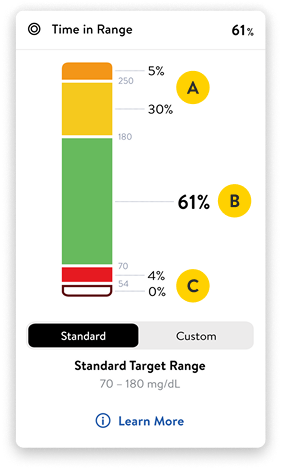
1. Spend more time in range (TIR).
The TIR report shows the amount of time your sensor glucose readings were:
 Above target glucose range (orange or yellow)
 Within target glucose range (green)
 Below target glucose range (red)
The more green you see, the better!

Did you know?
More time in range can lead to lower A1C levels2. Even small changes can make a difference!
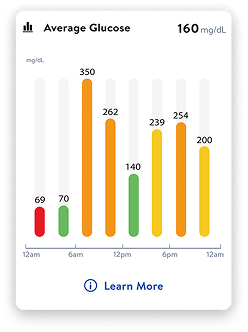
2. Get a quick glance at your average glucose levels.
Use reports to see your average numbers hour by hour and day by day. That way, you can start finding the trends that affect your progress.
For example, if you see your glucose numbers are higher when you first wake up, share this pattern with your healthcare provider.
Small changes—like having a lighter dinner—may help you wake up closer to your target glucose range.
Did you know?
You can share§ glucose readings with your healthcare team through LibreView||. Set up an account in the Libre app* or online at LibreView.com.
Not actual patient data.

Not actual patient data.
3. Reduce overnight lows.
Reports can help you spot low glucose events and glucose patterns, including those that happen overnight.
Seeing this data gives you the information you need to understand what may be contributing to lows—such as food, activity, or sleep.
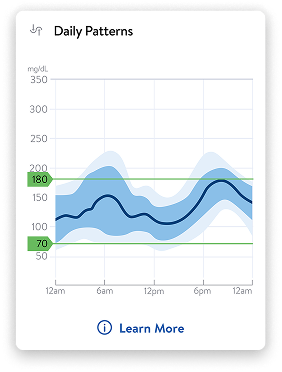
4. View daily patterns.
This report shows a graph with your glucose patterns from that day. The black line shows the median (or midpoint) of your glucose readings.
These graphs can help you make more informed choices¶3.
Not actual patient data.

Not actual patient data.
5. Get an estimate of your A1C.
The glucose management indicator (GMI) report uses your average glucose to give you an estimate of your A1C.
Your A1C shows your average glucose level over the past 3 months. This is a helpful number to know, but keep in mind that it doesn’t show you your daily highs or lows.
Remember, progress happens one day at a time. And with the help of your Libre 3 Plus sensor, it can help lower your A1C¶5.
Discover how to get more from your glucose data with the Reports feature in the Libre app*.
Adding notes can help fill in the details about your glucose numbers.
Use the notes feature in your Libre app* to record meals/snacks, exercise, or medicines so your reports tell the full story†1 of your day.
Plus, you can see how far you’ve come—tracking your data can help you see progress you’re making towards your goals.
The complete guides to Libre systems
- Tips for wearing your sensor
- Understanding glucose readings
- Using alarms#

Visit the Libre Resource Hub for even more resources, including videos and tutorials, support tools, and community connections.

Get the most out of your next appointment.
When your healthcare team can see your data, they can help you make progress†1,4. The Libre systems reports help you and your healthcare provider see your personalized glucose trends and patterns to focus on what you need.
After looking at your own results, you may consider asking your healthcare provider questions like:
- Why are my glucose numbers out of range in the evenings?
- Can we adjust my insulin dose before bedtime?
You are an important part of your diabetes care team. And the more insights you share with your healthcare provider, the better you can work together to make the right choices for you.
Small steps can lead to big wins.
Remember—the goal isn’t to be perfect. It’s about learning what works best for you. Progress can mean noticing how your glucose levels change during the day. Your reports can help you spot small changes that make a big difference.

Looking for extra support? Get free 1:1 sensor training with a Certified Diabetes Educator.

Connect one on one with a Certified Diabetes Educator over the phone—for free. They’ll walk you through sensor setup, show you how to read your glucose patterns, and answer any questions you have along the way.
Or call directly at 1-833-855-4273.
Available Monday–Friday, 8 AM to 8 PM Eastern Time (excluding major holidays)
100% free. No credit card required. No strings attached.
More articles you may enjoy

How to get more from your glucose numbers
See how daily choices affect your glucose and how Libre systems show your unique patterns.

Answers to Libre app* alarms# questions
Learn to set, customize, and understand your glucose alarms#.

Meal order matters—start in a glucose-friendly way.
What you eat first and last can affect your glucose.
Share this article:


FreeStyle Libre 3 system is cleared to be used by children 4 years and older with Libre 3 sensor and 2 years and older with Libre 3 Plus sensor.
FreeStyle Libre 2 system is cleared to be used by children 4 years and older with Libre 2 sensor and 2 years and older with Libre 2 Plus sensor.
Medicare and other payor criteria may apply.
* The FreeStyle Libre systems apps are only compatible with certain mobile devices and operating systems. Please check the Support section of our website for more information about device compatibility before using the apps. Use of the FreeStyle Libre systems apps may require registration with LibreView.
† Study was performed with the US version of the FreeStyle Libre 14 day system. Data is applicable to FreeStyle Libre 2 and 3 systems, as feature sets are similar as FreeStyle Libre 14 day system, excluding alarms.
‡ Default range is 70–180 mg/dL. Consult with a healthcare professional on individual target glucose range.
§ The user’s device must have internet connectivity for glucose data to automatically upload to LibreView and to transfer to connected LibreLinkUp app users.
|| The LibreView data management software is intended for use by both patients and healthcare professionals to assist people with diabetes and their healthcare professionals in the review, analysis, and evaluation of historical glucose meter data to support effective diabetes management. The LibreView software is not intended to provide treatment decisions or to be used as a substitute for professional healthcare advice.
¶ Study was performed with the outside US version of the FreeStyle Libre 14 day system. Data is applicable to FreeStyle Libre 2 and 3 systems, as feature sets are similar as FreeStyle Libre 14 day system, excluding alarms.
# Alarm notifications will only be received when alarms settings are enabled and turned on and sensor is within 20 feet (FreeStyle Libre 2) or 33 feet (FreeStyle Libre 3) unobstructed of the reading device.
♢ Eligible patients will receive one (1) FreeStyle Libre 3 Plus sensor for users with a compatible mobile phone operating system at $0 copay. The expiration date of the voucher is 60 days from the issue date. This program is available for patients with Type 1 diabetes or Type 2 diabetes or gestational diabetes. Patients ages 18 and older are eligible to sign up and receive an offer for the (1) FreeStyle Libre 3 Plus sensor. Patients ages 2–17 are eligible to receive an offer for the (1) FreeStyle Libre 3 Plus sensor through their parent or guardian. This offer is void where prohibited by law. Abbott may modify or rescind this offer at any time without notice. The discounts are not available to beneficiaries of Kaiser Permanente, Medicare, Medicaid, TRICARE, Veteran Affairs or other state healthcare programs, residents of Massachusetts, or US territories (other than Puerto Rico). The free (1) FreeStyle Libre 3 Plus sensor is provided as a sample and is limited to one sample per eligible person per product identification number. The FreeStyle Libre 3 Plus sensor cannot be re-sold, traded nor submitted to any third-party payer for reimbursement and is not provided as any inducement for future purchases. The free sample card is not health insurance.
References: 1. Unger, Jeff, Pamela Kushner, and John E. Anderson. “Practical Guidance for Using the FreeStyle Libre Flash Continuous Glucose Monitoring in Primary Care.” Postgraduate Medicine 132, no. 4 (2020): 305–313. https://doi.org/10.1080/00325481.2020.1744393. 2. Vigersky, Robert A. “The Relationship of Hemoglobin A1C to Time-In-Range in Patients With Diabetes.” Diabetes Technology & Therapeutics, 21 no. 2 (2019): 81–85. https://doi.org/10.1089/dia.2018.0310. 3. Fokkert, Marion, et al. “Improved Well-Being and Decreased Disease Burden After 1-Year Use of Flash Glucose Monitoring (FLARE-NL4).” BMJ Open Diabetes Research & Care 7, no. 1 (2019): e000809. https://doi.org/10.1136/bmjdrc-2019-000809. 4. Huang, Eileen, Mohamed Nada, and Eugene Wright, Jr. “73-LB: Ambulatory Glucose Profile Informs Better Treatment Decisions for Type 2 Basal-Insulin Patients.” Diabetes 71, no. Supplement_1 (2022): 73–LB. https://doi.org/10.2337/db22-73-LB. 5. Evans, Mark, Zoë Welsh, and Alexander Seibold. “Reductions in HbA1c With Flash Glucose Monitoring Are Sustained for up to 24 Months: A Meta-analysis of 75 Real-world Observational Studies.” Diabetes Therapy 13, no. 6 (2022): 1175–1185. https://doi.org/10.1007/s13300-022-01253-9.
ADC-2660131 v2.0