




LibreView***: Connect with healthcare providers.
Share glucose readings automatically§§|||| using one of two methods. Here’s how:
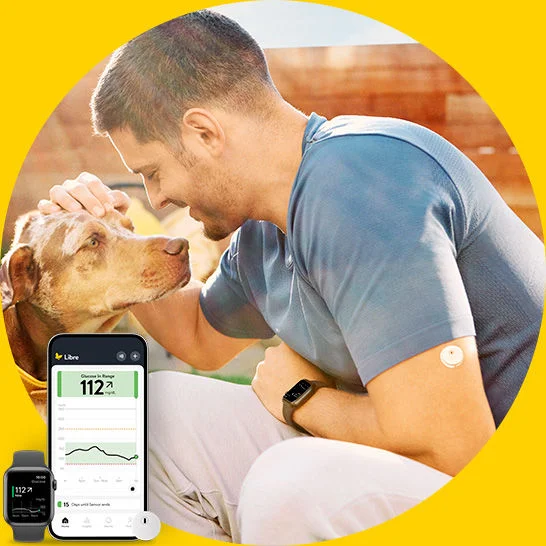
Easy just got easier¶. The Libre app* provides glucose readings in real time, anytime# on your smartphone*, and right on your wrist†**.
Updates automatically on your smartphone* every minute, making it easier¶ to stay on top of your glucose.
Now your app* experience includes the Libre Assist|| feature—so you can see how food affects your glucose§ with every meal.
Choose to silence select alarms‡‡ for up to 6 hours, for fewer interruptions during the day.
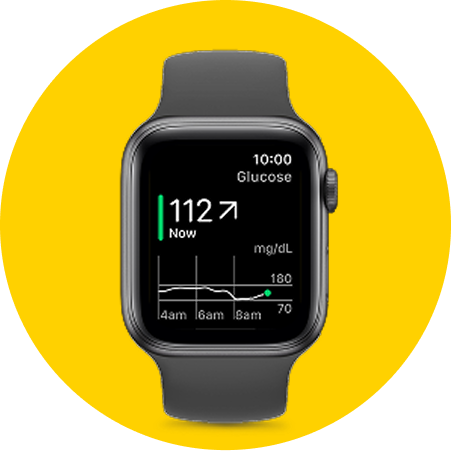
With the flick of a wrist, you can see glucose values, trends, and notifications**—without looking at your phone†.
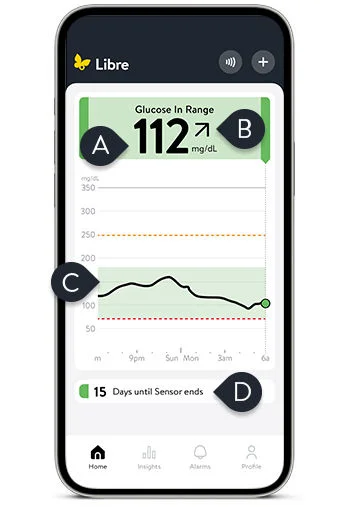
Current glucose reading
Trend arrow
Indicates how glucose is changing
Glucose history
Up to the last 12 hours of historical glucose values
Sensor life span
Watch how to view your glucose on the Libre app*.
Your readings, right on your wrist†**. See how to use the Libre app for Watch†.
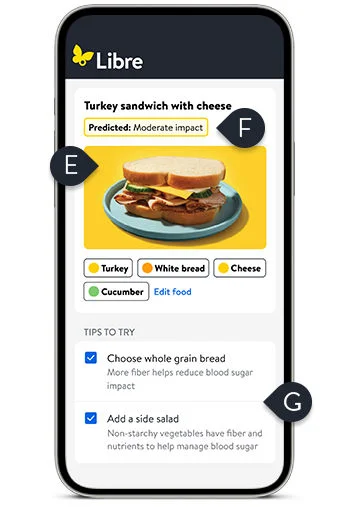
Take the mystery out of meals with Libre Assist|| , a new feature in the Libre app*.
Snap.
Take or upload a picture of your meal, or type a description of it into the app*.
Predict.
Find out how your food choices might impact your glucose§.
Know.
Get personalized recommendations‡ after eating, including tips|| on how to make your next meal more glucose-friendly.
Watch to see Libre Assist|| in action.
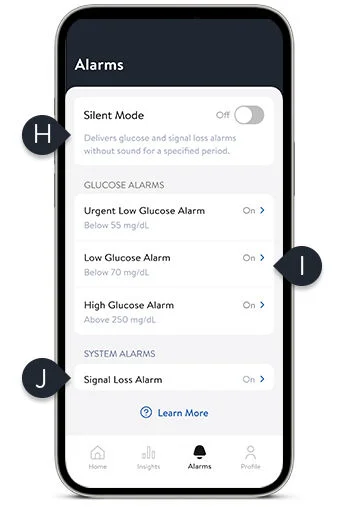
Silent mode‡‡
Lets you silence select alarms for up to six hours
Glucose alarms
Alerts you when glucose is too high or too low
Signal Loss Alarm††
Notifies you if the sensor disconnects from the app
Watch to learn how to set up your alarms on the Libre app*.
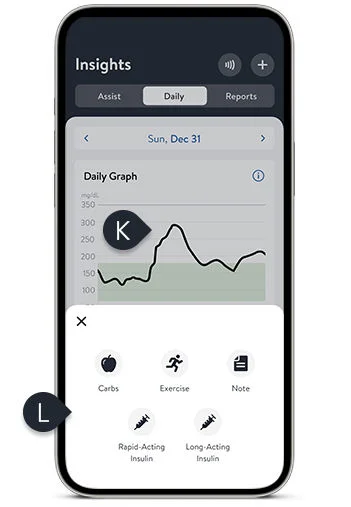
Find the readings, trends and setting you’re looking for.
Daily graph provides 24 hours of data.
Add notes about medication and other factors affecting your glucose.
Food • Exercise • Rapid-acting insulin • Long-acting insulin
Watch to learn more about viewing your reports.
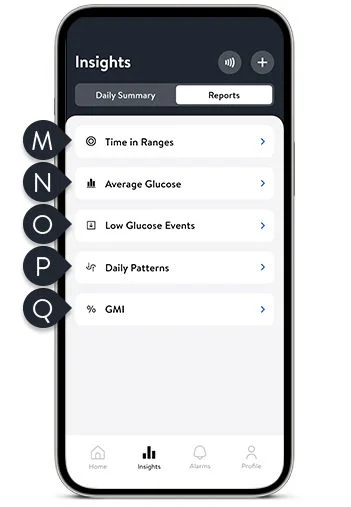
Time in Ranges reveals when sensor glucose readings are above, below, or within range.
Average Glucose displays your average daily glucose levels so you can see your true progress, regardless of data outliers.
Viewing your Low Glucose Events can help you understand the causes of hypoglycemia and avoid future events.
Daily Patterns reveal personal trends over time and can help you make informed decisions that work for you.
GMI (glucose management indicator) estimates your A1C.
Watch to learn more about viewing your reports.
Current glucose reading
Trend arrow
Indicates how glucose is changing
Glucose history
Up to the last 12 hours of historical glucose values
Sensor life span
Watch how to view your glucose on the Libre app*.
Your readings, right on your wrist†**. See how to use the Libre app for Watch†.
Take the mystery out of meals with Libre Assist|| , a new feature in the Libre app*.
Snap.
Take or upload a picture of your meal, or type a description of it into the app*.
Predict.
Find out how your food choices might impact your glucose§.
Know.
Get personalized recommendations‡ after eating, including tips|| on how to make your next meal more glucose-friendly.
Watch to see Libre Assist|| in action.
Silent mode‡‡
Lets you silence select alarms for up to six hours
Glucose alarms
Alerts you when glucose is too high or too low
Signal Loss Alarm††
Notifies you if the sensor disconnects from the app
Watch to learn how to set up your alarms on the Libre app*.
Find the readings, trends and setting you’re looking for.
Daily graph provides 24 hours of data.
Add notes about medication and other factors affecting your glucose.
Food • Exercise • Rapid-acting insulin • Long-acting insulin
Watch to learn more about viewing your reports.
Time in Ranges reveals when sensor glucose readings are above, below, or within range.
Average Glucose displays your average daily glucose levels so you can see your true progress, regardless of data outliers.
Viewing your Low Glucose Events can help you understand the causes of hypoglycemia and avoid future events.
Daily Patterns reveal personal trends over time and can help you make informed decisions that work for you.
GMI (glucose management indicator) estimates your A1C.
Watch to learn more about viewing your reports.
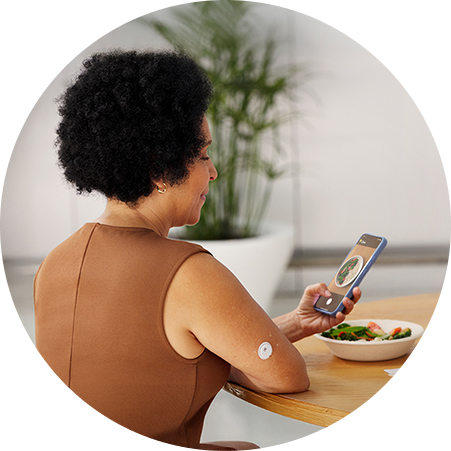
Make in-the-moment food choices.
The FreeStyle Libre 3 Plus sensor, along with Libre Assist||, can help you predict the impact of food on your glucose§.
Snap.
Predict.
Know.
The Libre app for Watch† is here.
Existing Libre app users may need to update the Libre app for Watch† separately. Currently available only for Apple Watch.
Easily share§§ glucose readings with loved ones and your healthcare team to keep them in the loop||||, thanks to our secure¶¶##, cloud-based storage system***. The FreeStyle Libre systems give you two ways to connect—LibreView*** and LibreLinkUp†††.
Create a LibreView account.
You can set up an account in the Libre app* or online at LibreView.com.
Option 1: Ask a healthcare provider to email an invite.
Follow the instructions in the email and your glucose data will be shared automatically.
Option 2: Enter a healthcare provider’s ID.
Get your healthcare provider’s ID number and enter it into the Libre app* your LibreView*** account.

Send an invitation.
Invite people to join you through the Libre app*
Ask them to download the app†††.
Loved ones can download the LibreLinkUp app††† on the App Store or on Google Play.
Make the connection.
Open the app††† and start sharing your readings.
For more information and support, please visit: LibreLinkUp.com.


The product images are for illustrative purposes only. Not actual patient data.
Medicare and other payor criteria may apply. Abbott provides this information as a courtesy and does not guarantee payment or coverage.
Coverage and out-of-pocket costs may vary based on your individual insurance plan. Please contact your insurance provider directly to confirm your specific benefits and eligibility.
* The FreeStyle Libre systems apps are only compatible with certain mobile devices and operating systems. Please check the Support section of our website for more information about device compatibility before using the apps. Use of the FreeStyle Libre systems apps may require registration with LibreView.
† The Libre app for smartwatches is only compatible with certain devices and operating systems. Please check the Support section of our website for more information about device compatibility before using the app. Use of the Libre app may require registration with LibreView. The Libre app for smartwatches should not be used to make treatment decisions. Please follow the Libre app instructions on your smartphone.
‡ Personalized food suggestions are based on food preference information inputted by the user.
§ Predicted glucose impact is based on user-provided food data and may differ from actual impact, which depends on sensor readings and factors like activity, stress, medication, and alcohol. For personalized advice, consult your healthcare provider
|| Libre Assist is a feature within Libre app that uses generative artificial intelligence to provide information on how foods could impact your glucose levels. Generative artificial intelligence may not always be accurate, and it should not be used to make treatment decisions.
¶ The Libre app works with Libre 2 Plus and Libre 3 Plus sensors and glucose data updates automatically without scanning the sensor. The Libre app for smartwatches allows users to view their glucose information and notifications on their smartwatch that is in range of their connected smartphone and sensor.
# 60-minute warm-up required when starting the sensor.
** Glucose information and notifications will only be received when your smartphone is within range of your sensor and smartwatch. Notifications seen on your smartwatch are mirrored from the Libre app on your smartphone. You must enable the appropriate settings on your smartphone to receive alerts on your smartwatch.
†† Alarm notifications will only be received when alarms settings are enabled and turned on and sensor is within 20 feet (FreeStyle Libre 2) or 33 feet (FreeStyle Libre 3) unobstructed of the reading device.
‡‡ Silent mode allows users to silence their signal loss and glucose alarms, including urgent low glucose alarm for up to six hours. You will not hear your glucose and signal loss alarms even if you've turned on Override Do Not Disturb but may still get the visual and vibratory notifications based on your phone's settings.
§§ The user's device must have internet connectivity for glucose data to automatically upload to LibreView.
|||| The FreeStyle Libre systems apps are designed to facilitate data sharing between patients and their healthcare providers and caregivers.
¶¶ LibreView is ISO27001/27018/27701 certified and HITRUST CSF Certified.
## LibreView is hosted in world-class data centers that feature biometric security, data back-ups, redundant power supplies and continuous surveillance systems. All data transferred to LibreView is encrypted using industry-standard SSL/TLS to ensure that it remains private from malicious parties.
*** The LibreView data management software is intended for use by both patients and healthcare professionals to assist people with diabetes and their healthcare professionals in the review, analysis and evaluation of historical glucose meter data to support effective diabetes management. The LibreView software is not intended to provide treatment decisions or to be used as a substitute for professional healthcare advice.
††† Check the support section of www.librelinkup.com for information about mobile device and operating system compatibility. LibreLinkUp is not intended to be used for dosing decisions or to replace self-monitoring practices as advised by a physician and requires registration with LibreView.
‡‡‡ Based on pharmacy claims for the aggregate of patients covered by Commercial insurance, Managed Medicare, Managed Medicaid using the FreeStyle Libre personal CGM systems versus Dexcom CGM systems. Does not include fee-for-service Medicare or fee-for-service Medicaid. The actual cost to patients may or may not be lower than other CGM systems, depending on the amount covered by insurance, if any.
Reference: 1. Data on file. Abbott Diabetes Care, Inc.
The "Yes" link below will take you out of the Abbott Laboratories family of websites. Links which take you out of Abbott Laboratories worldwide web sites are not under the control of Abbott Laboratories, and Abbott Laboratories is not responsible for the contents of any such site or any further links from such site. Abbott Laboratories is providing these links to you only as a convenience, and the inclusion of any link does not imply endorsement of the linked site by Abbott Laboratories.
Do you wish to leave this site?